What you're looking at, and why you can trust it.
Tijori (तिजोरी, "strongbox") is a browser-native password vault. Unlike a hosted password manager, Tijori has no account and no dedicated service holding your data. Standalone, your vault is a folder of files on your disk. Inside NakliOS, you may instead grant Tijori an app-scoped Folder or encrypted Crate backend.
This page shows every screen of the app, explains how it's built, and is honest about the tradeoffs. Asking you to trust a browser app with your passwords is a big ask — here's everything you need to make that decision.
Three ways to run it
Pick whichever you trust most. They all do the same thing.
1. Open the URL
naklitechie.github.io/Tijori — loads once, makes zero network requests after that. No service worker yet; keep the tab open or bookmark it.
2. Save the page
File → Save Page As → index.html. Open it from disk any time.
One file, no internet required, works on any device with Chrome or Edge.
3. Clone and read
github.com/NakliTechie/Tijori
— read every line, then serve with python3 -m http.server.
No build step. No dependencies to audit.
4. Run inside NakliOS
Open Tijori from naklios.dev. A connected Folder or encrypted Crate backend is exposed only through Tijori's app-scoped namespace. The standalone folder path remains available.
The full user flow
Every screen in order, mobile view.
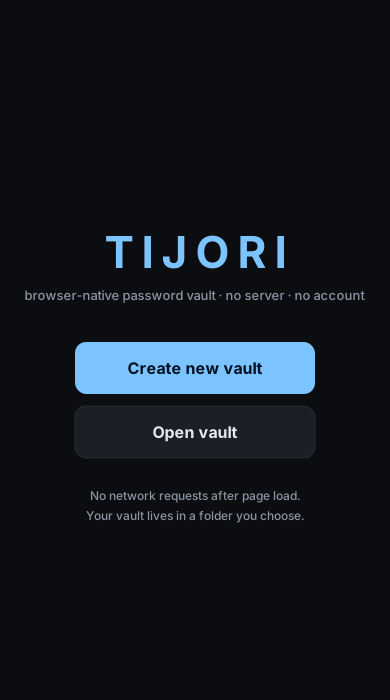
First visit: create or open a vault.
Create new vault opens the OS folder picker — point at an empty folder, set a master password, and the vault is created there. Open vault points at an existing vault folder from another device, a cloud folder, or a backup.
On return visits, if your browser still holds permission to the folder, Tijori skips straight to the Unlock screen.
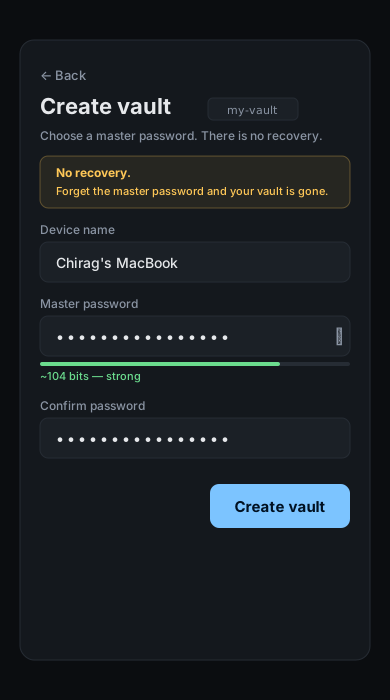
Name this device. Set the master password.
The device name labels this browser's event stream in the roster. The entropy meter gives live feedback — aim for at least 50 bits (four random words is fine).
The yellow box is not decoration. Tijori cannot reset your master password. It has never seen it. If you lose it, the vault contents are unrecoverable.
Considering a hardware key? You can bind one after creating the vault, from Settings → Security. Hardware keys are a second factor — both the master password and the key will be required to unlock. Best practice: bind two keys (a primary and a backup).
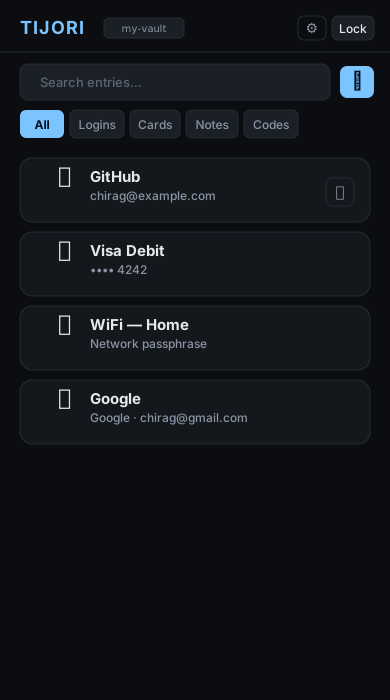
All entries in one searchable, filterable list.
The All tab shows Logins, Cards, and Notes together. Switch to Codes for the TOTP grid. Search filters live as you type.
Click ⎘ on any Login or Card row to copy the password or card number directly — no need to open the entry. The clipboard auto-clears after the timeout you set in Settings.
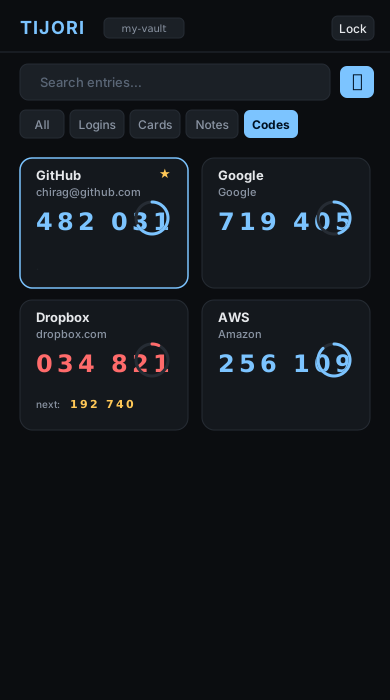
TOTP codes in a glance grid with countdown rings.
Tap Codes to switch to this view. Each tile shows the label, current code, and a ring counting down to rotation.
When a code expires in the last ~5 seconds (shown in red), the next code appears below it for smooth handoff. Tap any tile to copy. The tile flashes green. Star a tile to pin it — pinned codes sort first.
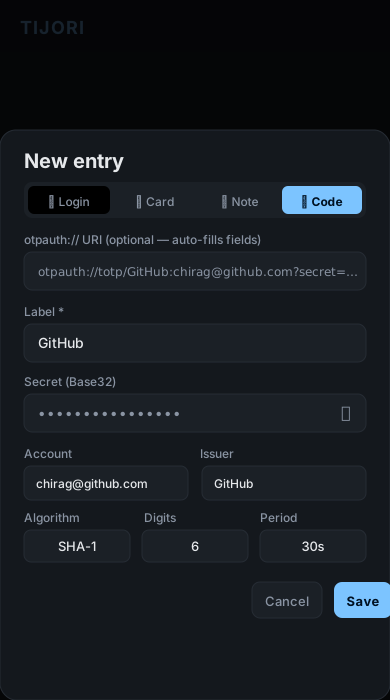
Paste an otpauth:// URI or type the secret manually.
The top field accepts an otpauth://totp/ URI — paste it and
Label, Account, Issuer, Algorithm, Digits, and Period fill in automatically.
Most 2FA setup pages offer a "can't scan?" link that reveals the URI.
The secret is AES-256-GCM encrypted in the event log, identical to passwords. Nothing about your TOTP configuration leaks to the file system in plaintext.
Bulk import: Settings → Data → Import → otpauth:// URIs — paste one URI per line to import many codes at once.
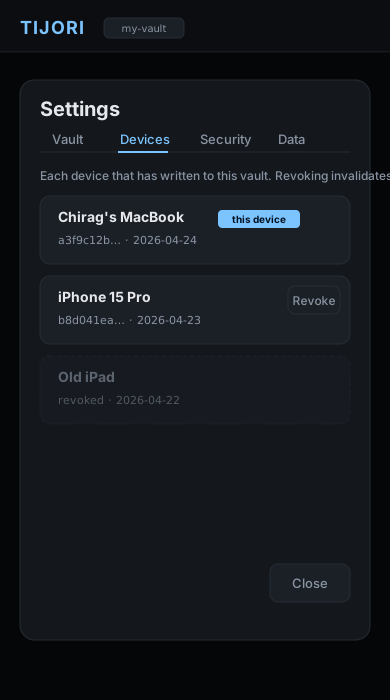
Every device that has ever written to the vault.
When a second browser opens the vault folder, Tijori detects it's a new device,
asks for the master password to verify, adds a device_registered
event, and starts its own event stream. No coordination needed.
Revoking a device emits a device_revoked event.
On the next merge, events from that device timestamped after the revocation
are skipped. Lost a device? Revoke it from any other synced device.
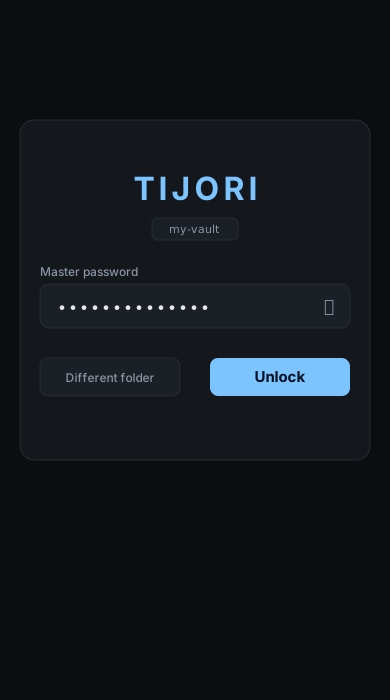
The master password is the only key. No back door.
The derived key is held in memory only while unlocked. Idle timeout, the Lock button, or tab-hide lock wipes it from memory.
Wrong passwords are rejected by AES-GCM's authentication tag — there is no "close enough." Tijori doesn't phone home with failed attempts because it can't.
Different folder lets you point at another vault on disk without reloading — useful for separate personal and work vaults.
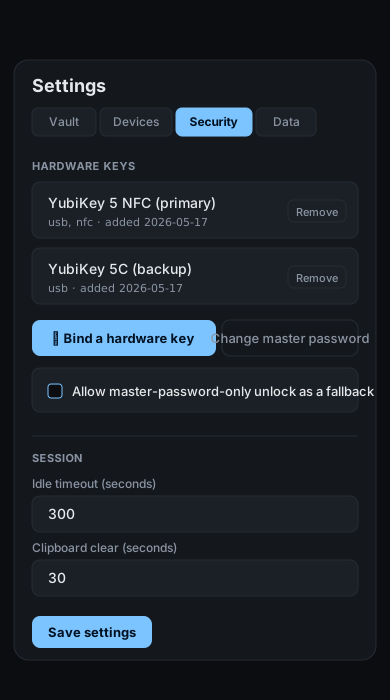
Hardware-key binding lives here.
Bind a hardware key registers any FIDO2 / WebAuthn authenticator — YubiKey, Touch ID, Windows Hello, iCloud passkey — as a second factor. Both the master password and the key are required to unlock after binding.
Register a second key as soon as you've bound the first. A single hardware key with no fallback is a single point of failure. Tijori reminds you until you've bound two keys or explicitly enabled password-only fallback.
Password-only fallback lets the vault be unlocked with just the master password as a recovery path. Enabling it weakens the second-factor model — a stolen password alone could unlock the vault. Choose based on whether convenience or strict-two-factor matters more for your threat model.
Change master password requires touching every bound key once, because each key's wrap blob has to be regenerated against the new password.
How it's built
Every claim below is verifiable by reading index.html — one file, no build.
| Concern | Implementation |
|---|---|
| Key derivation (v2 vaults) | Argon2id, m=64MB, t=3, p=4. WASM blob inlined (~45KB base64), no CDN. |
| Key derivation (v1 vaults) | PBKDF2-SHA-256, 600,000 iterations. Auto-upgrades to Argon2id on next save. |
| Entry encryption | AES-256-GCM, random 12-byte nonce per event. Payload is JSON, encrypted to opaque base64. |
| Hash chain | SHA-256 of previous raw event-line string, embedded as prev_hash. Break any byte, break the chain. Verifiable in-app via Settings → Vault. |
| TOTP | RFC 6238 over WebCrypto HMAC-SHA-{1,256,512}. Base32 decoder inline (~25 lines). No library. |
| File I/O | Standalone: File System Access API (showDirectoryPicker) with an OPFS fallback. Hosted: app-scoped naklios.fs over the Folder or Crate backend the user grants. |
| Network requests | Tijori itself makes zero after page load; CSP has connect-src 'none'. In hosted Crate mode, NakliOS performs storage transport outside the Tijori iframe. |
| Hardware-key binding | WebAuthn PRF extension. Multiple keys per vault. master_secret wrapped per key — never re-encrypts vault data, only the wrap blobs change. |
| Dependencies | Zero. No CDN, no npm, no framework. |
| Build step | None. The source file is the app. |
Tradeoffs you're accepting
Honest about what this model costs you.
.tijori file
in a cloud folder; it is AES-256-GCM encrypted with your master password.
Browser requirement
Desktop folder picking requires Chrome or Edge. Firefox and Safari use the OPFS fallback standalone; inside NakliOS they can use a connected host backend.
Combined passwords + TOTP
Both passwords and 2FA codes share one master password and one device. This is a deliberate UX-vs-separation tradeoff. If you want strict isolation, run Tijori and Rotor against separate folders with separate master passwords.
Silent LWW merge
Merge is per-field last-writer-wins, sorted by timestamp. Two devices editing the same field concurrently: the later timestamp wins. No diff UI — the result is deterministic and silent.
Soft revocation
Revoking a device prevents its future events from being merged. It does not re-encrypt the vault. A revoked device that already has a copy can still decrypt with the master password. Full remediation: revocation + master password change.
What Tijori protects against, and what it doesn't
Be honest about this before deciding to trust the app.
✅ Things Tijori does protect you from
Server breach
There is no dedicated Tijori service or account database to breach. Standalone data stays in your chosen folder; hosted data goes only to the NakliOS Folder or encrypted Crate backend you grant.
Vendor lock-in
The vault is yours, on your disk, in a format documented in this guide. Tijori shutting down tomorrow doesn't strand your data. Open the .jsonl files in a text editor; the format is plain JSON.
Cloud snooping
If you sync via Dropbox, iCloud, Google Drive, or Syncthing, the cloud provider sees only AES-256-GCM ciphertext. They cannot decrypt without your master password (and, if you bind one, your hardware key).
File tampering
The event log is hash-chained. Any single-byte modification breaks the chain. Verifiable from Settings → Vault → Verify log integrity.
Bulk credential stuffing
Each vault has a unique salt. There is no "Tijori user database" to leak.
Password breach (with hardware-key binding)
With a bound hardware key, knowing your master password is not enough. An attacker also needs physical access to your registered authenticator.
⚠ Things Tijori partially protects you from
Malicious browser extensions
Any browser-based password vault is theoretically reachable by an extension with broad permissions. Mitigations: strict CSP (connect-src 'none' means an extension can't exfiltrate to its own server through Tijori's network context), no extension hooks in our code. Defence in depth: run Tijori in a separate Chrome profile with minimal extensions.
Shoulder surfing
Tijori uses bullet-point password fields and clipboard-copy buttons that don't display the value. Idle lock + lock-on-tab-hide reduce exposure. None of this helps against a camera over your shoulder.
❌ Things Tijori cannot protect you from
Malware on your device
A keylogger captures your master password as you type it. Memory inspection by privileged malware reads the vault key while unlocked. No browser-based vault — and no native vault — fully defends against this. Tijori is not magic.
Forgotten master password
There is no recovery. By design. If you forget the master password and don't have a hardware key with password-only fallback disabled, the vault contents are mathematically unrecoverable. Back up your password the same way you back up your vault.
Lost hardware key (without a backup)
If you bind a single hardware key and disable password-only fallback, and that key is lost, the vault is unrecoverable. Always register a backup key, or accept the password-only fallback as your recovery path.
Coercion
Tijori cannot detect that you are being forced to unlock. No vault can.
How Tijori compares
| Vault | Server | Account | Hardware-key support | Recovery |
|---|---|---|---|---|
| Tijori | none | none | WebAuthn PRF (free, optional) | None — back up the file |
| Bitwarden | hosted (or self-host) | required | YubiKey (paid tier) | Email reset (cloud) |
| KeePassXC | none | none | YubiKey HMAC-SHA1 (USB native) | None — back up the .kdbx |
| 1Password | hosted | required | Yes (all tiers) | Account recovery via Secret Key |
| pass / passage | none | none | Hardware-key via GPG card | None — back up the directory |
Tijori sits closest to KeePassXC. The differences: Tijori is browser-native (no install), uses an append-only event log instead of a monolithic .kdbx (multi-device merge is deterministic), and supports any FIDO2 authenticator via WebAuthn PRF (no driver, no native code).
Living with your vault folder
What's safe to do with the folder day-to-day, and what isn't.
The folder is a bag of append-only files. tijori-meta.json is plaintext (KDF params, device roster — no secrets). Each device writes only to its own tijori-events-<deviceId>.jsonl. On unlock, Tijori reads every .jsonl it finds and merges deterministically by (timestamp, device_id). The mental model: anything that adds or duplicates files is safe; anything that shrinks, truncates, edits in place, or replaces a file with an older copy is where you lose data.
✅ Safe — the architecture is built for these
Sync the folder across devices
Dropbox, iCloud Drive, Google Drive, Syncthing, Git — all work. Each device writes only its own log file, so no file-level conflicts. Every device sees all logs and merges on unlock.
Copy the folder to a new device
Open it on the new device → Tijori sees this device isn't in the roster and routes you through device registration. After that, the new device writes its own log alongside the old one. Both merge on unlock.
Move or rename the folder
File-system operation, no data impact. The browser's folder permission may need to be re-granted — just use "Open vault" and pick the new location.
Back up the folder as a zip
Restoring rewinds you to that point in time. Pair with the encrypted archive export (Settings → Data) for offsite backups.
⚠ Risky — these can lose data or confuse the device roster
Restoring an old backup over a newer folder
You lose every event after the snapshot. Sync tools usually win by keeping the newer file; manual restores don't. If you must restore, do it onto an empty location, not on top of a live folder.
Using the vault on two devices without sync
Each device builds its own log in its own folder; they diverge. Manually copying one folder over the other will lose half the work. Pick a sync transport (cloud folder, Syncthing, Git, or QR flash) and stick to one.
Editing a .jsonl file by hand
Each event line embeds prev_hash = sha256(prev_line). Any byte-level edit breaks the chain. Tijori excludes the entire device's events on next unlock with a "Chain integrity failure" toast. Restore the file to recover.
Clearing browser data / different browser
Device ID lives in localStorage, not the folder. Cleared localStorage → next open registers as a new device with a new log file. The old log still merges fine, you just get an orphan in the device roster. Revoke it from Settings → Vault.
Hand-copying log files between folders
Works — the merge ingests every tijori-events-*.jsonl it finds, regardless of roster membership. But the device roster in tijori-meta.json won't know about the foreign device until a registration event for it gets included.